The foundation for your AI-powered company

Your AI business foundation

Your business is getting an AI workforce. Give it a place to work.

Give your company a Shared AI Business Brain: the priorities, decisions, and current knowledge your people and AI agents need to work together. The dashboard, mobile app, AI connection, and dedicated MCP server come built in. Add Machines as you grow. Yours to own.

Your company's Shared AI Business Brain. Keep people and AI aligned on current priorities, decisions, and the knowledge that matters now. Yours to own.

Ownbox on a desktop monitor and a phone, on a sunlit terrace above the sea.

The Ownbox film

  • $799 one-time
    One Machine included
  • Connect your Claude, ChatGPT
    or OpenRouter account
  • No contracts
    No lock-in

The problem

More AI tools won't fix disconnected work.

Your team keeps repeating instructions. Your AI agents can miss a change in direction, a recent decision, or the context behind a task. Give both a shared source of the current knowledge that matters.

The foundation

One shared brain. Everything connected.

Your Shared AI Business Brain keeps the important current knowledge about your company's direction, priorities, and decisions available to your people and connected AI agents. Four built-in capabilities put it to work.

Keep Google Drive, Dropbox, your CRM, and accounting.

Your files and day-to-day records stay in those systems. Use Ownbox for the important current information about where your company is going, what has changed, and what people and AI agents need to know to work together. It complements your file storage; it does not replace it.

A Shared AI Business Brain at the center of your Ownbox. Business Dashboard and Mobile App connect from the people side. AI Connection and Dedicated MCP Server connect from the AI agents side.
  • Find the answer inside the knowledge that matters.

    Search supported documents you have chosen for the Brain and retrieve the relevant passage — not just a filename.

  • Turn new decisions into shared context.

    Review useful updates proposed by your agents before adding them to the Brain, so the next person or connected agent can work from them.

  • Change AI tools without starting over.

    Keep the knowledge you have built. Connect another supported agent to the same Brain, subject to its access permissions.

Explore the five essentials in detail

  • Shared AI Business BrainCurrent business direction and knowledge for your people and connected AI agents.

    Explain your business once. Every AI agent works from it.

    Keep your current briefs, priorities and decisions on your Ownbox, with the price lists, procedures, contracts, and spreadsheets behind them. Claude, ChatGPT, and other compatible agents read inside them, find the exact passage they need, and can add what they learn. Each new document waits for your OK.

    New

    • Reads inside PDFs, Word documents, and Excel spreadsheets, not just file names.
    • Search that returns the exact passage, across your files, inbox, and articles.
    • A Public folder: documents you approve become answers that AI assistants and search engines can read. Nothing else on your Ownbox is exposed.

    Always

    • Switch AI providers anytime. Your Brain stays.
    • Agents can't delete your files.
    • Deleted files wait 30 days, and you can export everything.
    • 5 GB with Core, 15 GB with Pro.

    PDF · Word · Excel · Passage search · Public folder · Saves wait for your OK

    The Shared Brain: the business's own files, kept on its Ownbox.
  • Business DashboardSee the work your Machines are doing and the decisions waiting for your team.

    Know what's happening in one place.

    See Machine activity, shared work, and decisions waiting for your team. Invite people and manage their access from one dashboard.

    Web dashboard · Team access · Activity

    The Ownbox Home: what is waiting for your OK, today's numbers and the machines.
  • AI ConnectionConnect a supported Claude or ChatGPT account, or a compatible API key.

    Use the AI account you already have.

    Connect a supported Claude or ChatGPT account, or use an API key where supported. Your AI provider's plan, limits, and charges still apply.

    Supported AI sign-in · Optional API connection

    The dashboard's AI page: the account this box drafts on.
  • Dedicated MCP ServerGive compatible AI agents controlled access to your Ownbox tools and information.

    Give agents a controlled way to work.

    Each Ownbox has an MCP endpoint for compatible agents to use permitted business tools and information. Access and actions are governed by your setup.

    MCP tools · Permissions · Activity history

  • Mobile AppReview conversations and keep work moving from your phone.

    Keep work moving from your phone.

    Add Ownbox to your iPhone or Android home screen. Review conversations and pending work without returning to your desk.

    iPhone + Android · Home-screen app

See it work — Unified Inbox

A message comes in. Your AI drafts. You approve.

Here is one workflow available through the Unified Inbox Machine: a customer message, an AI draft, and a person deciding what is sent.

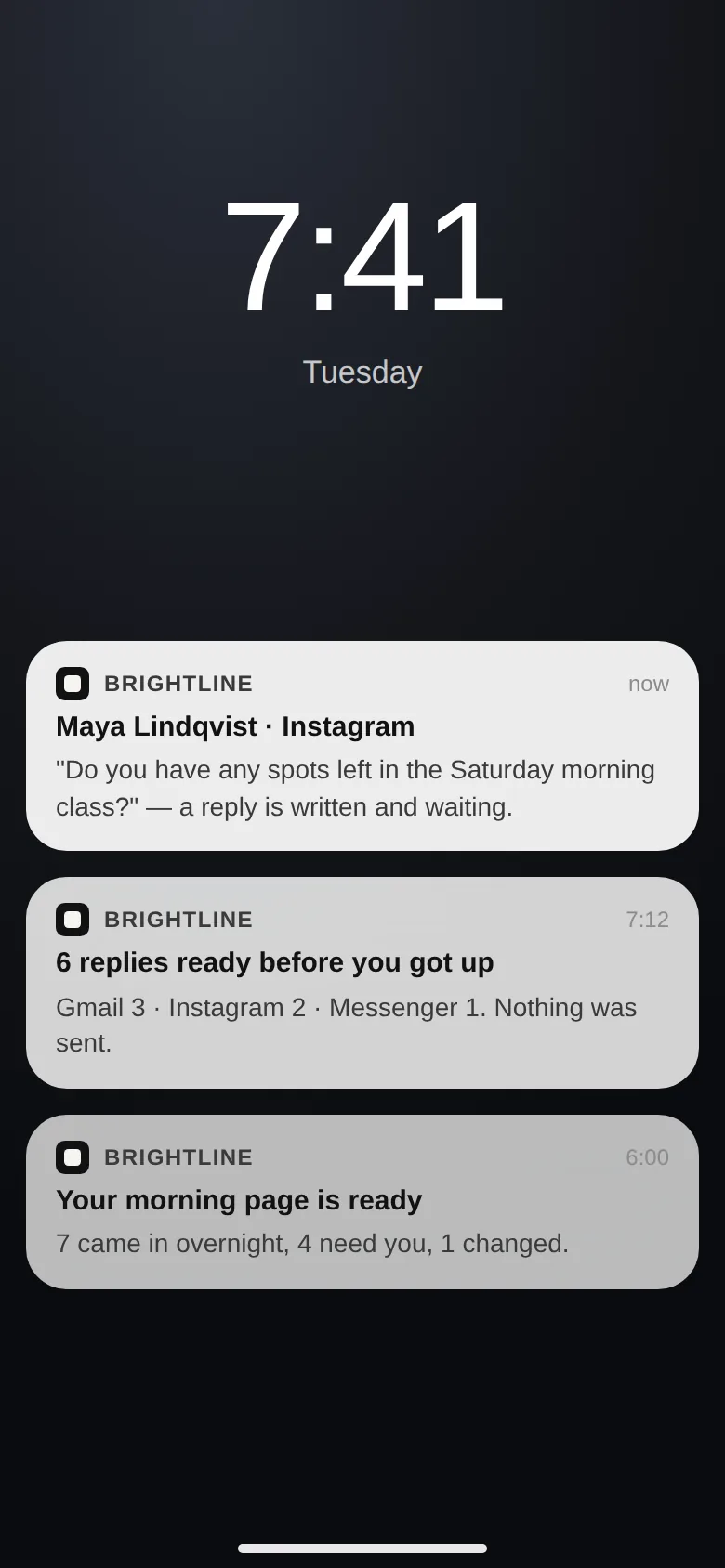
  1. Ownbox notifications on a phone's lock screen: Maya's Instagram question and Marcus's Messenger question, each with a reply written and waiting, and six replies ready for your OK.

    A customer reaches out.

    A supported email or direct message arrives in one unified inbox, with the conversation in view.

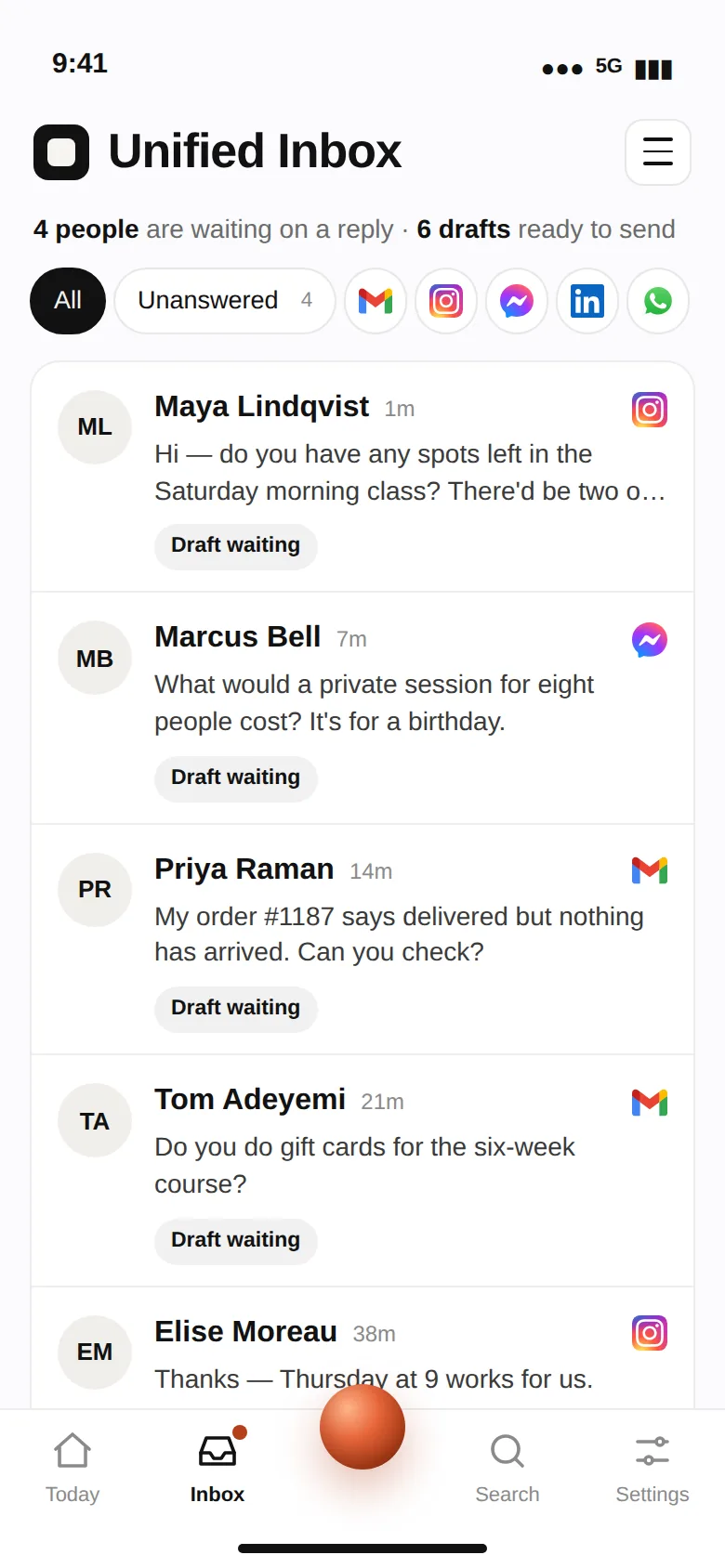
  2. The Ownbox inbox: Maya's Instagram question about Saturday's class, and the reply written for her, with Approve and send and Edit.

    AI prepares a reply.

    A draft appears alongside the conversation using your connected AI account.

  3. The Ownbox Home: four things waiting for your OK, today's numbers, the unified inbox with drafts ready, and the machines.

    You decide what goes out.

    Review, edit, and send the reply from your desktop or phone.

See the Unified Inbox

Ready today

Start with one job. Add more when you're ready.

Ownbox Core includes your choice of one available Machine. Ownbox Pro includes both.

The Unified Inbox: one queue of emails and DMs, each with a drafted reply.

Unified Inbox

  • Core: pick one of the two
  • Pro: included

Bring your customer conversations together. See supported Gmail, Instagram, and Messenger messages in one unified inbox. Let AI draft replies, then review and respond from your dashboard or phone.

The SEO Machine on a phone: four articles live, one being written and one next.

SEO Machine

  • Core: pick one of the two
  • Pro: included

Help customers find answers from your business. Create and publish useful answers to the questions future customers ask. Apply publishing checks and connect Google Search Console to track search visibility.

Available now: Unified Inbox and SEO Machine. Search visibility, AI citations, and lead volume are not guaranteed.

Built to expand

One foundation. More useful work over time.

Start with a job that matters today. Add more Machines as they become available, or build one for a workflow specific to your company. Your team and AI agents keep working from the same foundation.

A person walking across a stone terrace toward a tall lit stone gateway, with the sun setting over the sea inside it.

Ownership

Build your future on a foundation you own.

No lock-in. No contracts. Subscriptions cost more the longer you stay, and leaving means starting over. With Ownbox, every month you stay builds something that's already yours.

  • Its own cloud server

    Your Ownbox runs on its own DigitalOcean cloud server, with business data separate from other Ownbox customers.

  • Your data and your software

    Any subscription lets you export your data. Ownbox lets you keep the whole thing: the software, with a perpetual license, and everything your team and AI agents have built in it.

  • Freedom to move

    Begin with Managed Support, then move Ownbox to your own DigitalOcean account any time from 30 days after you buy, and we'll make the move with you. You keep using the software while paying DigitalOcean directly.

Getting started

Three steps, and your Ownbox is running.

  1. Choose Core or Pro.

    Core includes one of the two available Machines. Pro includes both.

  2. We prepare your Ownbox.

    After checkout, we deploy your cloud server and email your access details in about five minutes.

  3. Connect your accounts.

    Sign in with a supported AI account and connect the services your Machine needs. Then start working from your dashboard or phone.

Start with the decisions that matter now.

Add a short company-direction brief, current priorities, and one recent decision. Connect a supported AI agent, then ask: “What should our team focus on, and what has changed?” Review the answer against those sources.

Ownbox runs on Ownbox

Our own results, from our own Ownbox.

  • 33articles published on ownbox.io since September 25
  • 207times ChatGPT, Claude and other AI assistants opened ownbox.io to answer someone, in the last 7 days
  • 121documents in the AI Brain that runs the company
This is my Ownbox, running my business, right here on my phone.
Brian MacDonald, founder and CEO of Ownbox

From Brian MacDonald's own Ownbox, which runs Ownbox's own business, not a customer's. As of October 30, 2026.

Where each number comes from
  • 33 Live from the articles published on ownbox.io.
  • 207 Live from ownbox.io's PostHog: AI assistants' visits, the last 7 days.
  • 121 The AI Brain on the owner's Ownbox: 121 files on 2026-10-28.

See every week

See it before you buy

Talk to the person who built it.

Not sure which Machine fits your business, what works today, or how ownership works? Talk directly with Brian MacDonald, founder of Ownbox.

How it works, for technical buyers
  • One Python service and one SQLite database, on an Ubuntu server of its own
  • Daily backups, and your keys on your own disk
  • An MCP server per Ownbox, locked with a token only you hold
  • Signed updates, installed by your Ownbox; it sends us a health report, which is all we read
  • Your business data exports in full, and your Ownbox can move to your own DigitalOcean account any time from 30 days after you buy

Build Your Ownbox.

Choose your foundation and included Machine. Review what you pay today and how managed hosting works after the included period.

Included in every Ownbox

  • Shared AI Business Brain
  • Business Dashboard
  • AI Connection
  • Dedicated MCP Server
  • Mobile App
Choose your foundation
Choose your included Machine

Free for a limited time. Each is $299 on its own after the offer ends.

Need private AI infrastructure? Talk about Ownbox Enterprise

Questions before you buy.

What do I get for $799?

You get Ownbox Core: the five-part software foundation on its own hosted cloud server, a dashboard and mobile app, and your choice of the Unified Inbox or the SEO Machine. Managed Support is included for the first 90 days. The AI service you connect is billed by its provider.

Which Machines can I use today?

The Unified Inbox for email and DMs and the SEO Machine are available now. Core includes your choice of one; Pro includes both. More Machines may come later, and none is included unless it is marked as available.

What AI account do I need?

A Claude Pro or Max plan, or a ChatGPT Plus, Pro or Business plan: you sign in to it from your Ownbox's settings. For Claude, an Anthropic API key works too. Gemini and Grok are planned. Your provider's plan limits and charges apply.

What will I pay after checkout?

Core costs $799 once; Pro costs $1,599 once. Managed Support is included for 90 days, then renews at $99/month for Core or $199/month for Pro unless canceled. Your AI provider may charge separately. If you move Ownbox to your own cloud account, that hosting provider bills you directly, about $12 a month on DigitalOcean.

Managed Support terms

What if I cancel Managed Support?

You keep your license to the software and your business data. After Managed ends, your Ownbox keeps running for 30 days from the day we tell you. In that time we can move it to your own DigitalOcean account with you, starting with a short setup call, or we power it off and keep a copy safe until you claim it or ask us to delete it. Updates and support end with Managed, and hosting doesn't stay free.

Managed Support terms

Who owns my data and the software?

Your business information is yours: it exports in full, and you can move your Ownbox to hosting you control any time from 30 days after you buy. The software comes with a perpetual license to run it for your business; it can't be resold or passed on.

More questions
Is Ownbox for marketing agencies?

Yes. Marketing agencies are who Ownbox is built for first. Your agency runs on it: client and prospect messages in one queue with a reply drafted for your OK, every client's brief and brand guide in one Shared AI Business Brain, and machines you build for your clients. Approved agencies can also join the 40% Partner tier of Earn with Ownbox.

See Ownbox for agencies

Do I have to move out of Google Drive, Dropbox, my CRM, or accounting software?

No. Keep those tools and their files or records in place. The Shared AI Business Brain is for selected current knowledge: your direction, priorities, decisions, and important updates. Add what people and connected AI agents need to work together. It is not a replacement for file storage or a full operational archive.

Do I need to know how to code?

No. Your Ownbox is deployed for you. You sign in, connect a supported AI account and the services your Machine uses, then work through the dashboard or phone app. Developers can also build their own Machines with the free SDK.

Is Ownbox a physical computer?

No. Ownbox is software deployed on its own cloud server. You use it through a web dashboard and a phone app. No physical hardware ships.

Can my AI send things without approval?

Only where you turn it on. In the Unified Inbox, drafts wait for you to review, edit and send. Auto-replies can be switched on for Instagram and Messenger; they're off by default, and email always waits for you. The SEO Machine publishes on its own schedule once you switch it on, after its publishing check.

Will the SEO Machine guarantee leads from ChatGPT or Google?

No. It helps create and publish answers to customer questions, and connects Google Search Console so you can track search visibility. Search rankings, AI citations and leads depend on factors outside Ownbox's control.

Are phone calls and SMS included in the Unified Inbox?

No. Today the Unified Inbox covers Gmail and other IMAP email, Instagram and Messenger. Outlook and Microsoft 365 aren't supported.

What happens if Ownbox stops operating?

Your Ownbox runs on its own server, with no license check that could switch it off. Moved to your own DigitalOcean account, it keeps running with your business information on it. What comes from Ownbox would stop: software updates, the Search Console connection and the ownbox.app web address.

Is my data private?

Your records live on your Ownbox's own server, not in a shared database. When your Ownbox asks your AI to draft or answer, that request is processed by your AI provider under your account's terms. When you connect an AI agent of your own, what it reads, it sends to its own AI provider, under your account with them. While Managed hosts it, backups stay with the same hosting provider.

Is the free Machine with Core a limited-time offer?

Yes. For a limited time, Ownbox Core comes with one Machine free: the Unified Inbox for email and DMs, or the SEO Machine. After the offer ends, each is $299 on its own. Pro includes both.

Can I upgrade from Core to Pro?

Yes, anytime from inside your Ownbox, for the $800 difference. Nothing moves.

Still exploring?

Not ready to build your Ownbox yet?

Get a short overview of how Ownbox works, what's included, and what it costs to own and operate.

We'll also share occasional updates as new Machines become available. Unsubscribe anytime. Privacy

From $799 · once, yours to own

Build Your Ownbox